Lead score conversion signals

What are conversion signals?
Conversion signals are an AI-powered Premium Conversation Intelligence™ capability designed to automatically and accurately tag the real-world outcomes of your customer conversations. These tags will appear in your main call log so you can easily identify conversation outcomes.
Why use the "lead score" conversion signals?
The "Lead Score" signals are created specifically to help score and qualify your leads. They unlock the full value of every conversation, helping you better understand and convert leads.
Lead Score Conversion signal tags:
- 'very good'
- 'good'
- 'fair'
- 'poor'
- 'very poor'
How to set up lead score conversion signals
You can manage conversion signals and add the new Lead Score signals in a few ways.
Important: Two Schedule Status signals, 'appointment booked' and 'appointment not booked', are already applied to your account by default (unless you previously removed them).
Option 1: Using the automation rules workflow settings
You can manage all conversion signals directly within the automation rule setup:
-
Navigate to the automation rules workflow settings page.
-
When setting up a new rule, look for the "conversion signals" section in the left-hand sidebar.
-
Click the pencil icon next to the conversion signals section.
-
You can now manage the Lead Score conversion signals (and any others) to apply them to your future calls.
Option 2: Using lead score templates
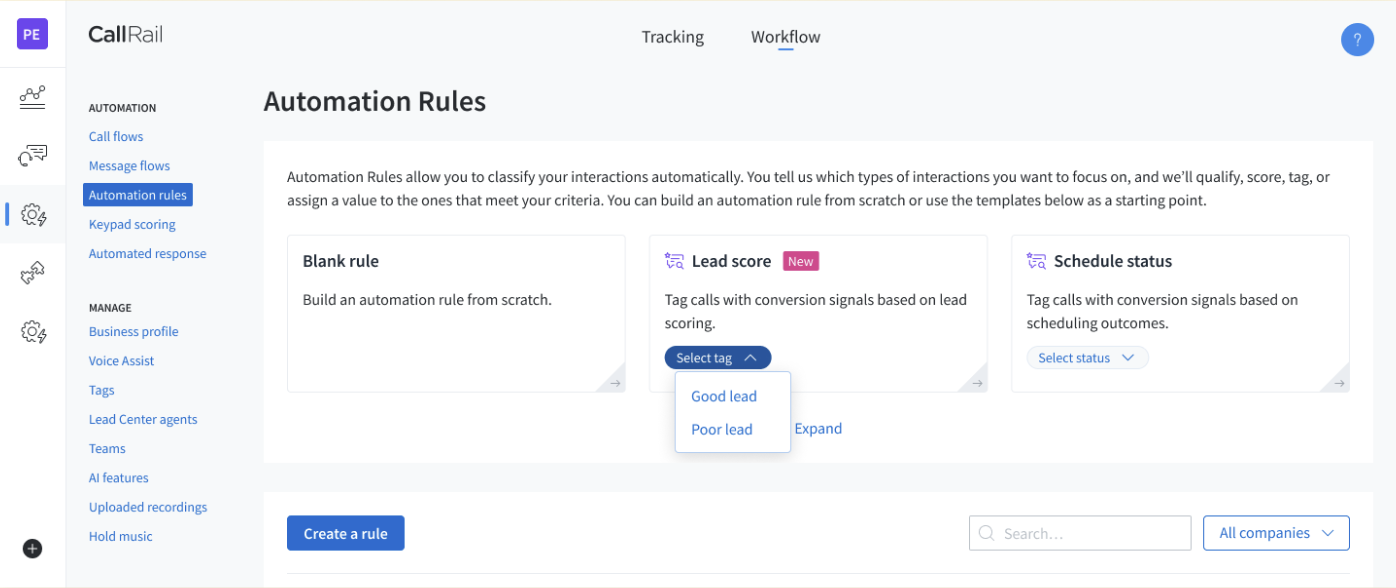
Quickly enable groups of signals using pre-built templates:
-
Go to the automation rules workflow landing page.
-
Look for the Lead score templates section.
-
Select from the dropdown menu to choose which Lead Score signals you want applied to your account.
Comments
Please sign in to leave a comment.